Proton VPN: Secure & Fast VPN
- 4.7
- Rating
- 100.00M
- Installs
- Free
- Price

 Analysis by App-foxy
I use VPN apps most when privacy has to work quietly in the background: on public Wi-Fi, while travelling, or when I want my connection to pass through a different location. Proton VPN: Fast & Secure VPN is built for that everyday job, but what interested me most was not the promise of speed. It was how clearly the app presents its choices, how much control it gives me before connecting, and whether the experience feels understandable rather than mysterious.
My overall impression is that this is a polished privacy and security tool for Android, made by Proton AG, with a free entry point and a more advanced paid path. It is available to everyone from an age-rating perspective, runs on Android 8.0 or later, and the current version is 5.15.70.0. The app has reached over 50 million installs and holds a 4.7 average from around 732 thousand ratings, which tells me it has become a mainstream option rather than a niche utility.
That popularity does not automatically make a VPN trustworthy, of course. A VPN sits between my device and the internet, so the important questions are practical: what am I choosing, what does the app ask me to do, and can I understand when the connection is actually protected? After spending time with it, I think Proton VPN is a strong choice for people who want a recognizable privacy-focused service without beginning with a subscription. It is less convincing for anyone who expects every location, advanced option, or convenience feature to be available for free.
You May Also Like

 AccuWeather: Weather Radar
AccuWeather Review: A Quick, Clear Forecast for Everyday Decisions
For everyday plans, the best forecast is the one you can understand quickly. AccuWeather makes rain timing, radar, and local conditions easy to act on, with a few trade-offs.

 Hill Climb Racing
Why Hill Climb Racing Still Turns Crashes Into One More Run
A tiny car, a bumpy hill and one more upgrade: Hill Climb Racing keeps resurfacing because its simple chaos makes every near-miss feel personal.

 AliExpress - Shopping App
AliExpress Makes Global Shopping Feel Personal, but Shoppers Bear the Risk
AliExpress turns a global marketplace into a pocket-sized discovery engine. Its reach is useful, its shopping loop compelling, and its trade-offs easy to miss.

 Lords Mobile: Kingdom Wars
Lords Mobile Is a Kingdom-Building Routine, Not a Quick Match
A case-by-case verdict on the building, battles, device demands, and social commitments that make Lords Mobile rewarding for some players and exhausting for others.

 PDF Scanner app - TapScanner
TapScanner Makes Paperwork Easier to Capture, Check, and Share
TapScanner makes scanning with a phone feel less like a rescue operation and more like a dependable step in getting work done. Its capture tools are useful, though not flawless.

 Block Blast!
 Shows How Much a Puzzle Game Can Leave Out
A quiet grid game shows why puzzle players increasingly value instant clarity, repeatable skill and low-pressure play—and where the genre still needs to catch up.
More From Our News Desk
View All News


How the app earns trust before I connect
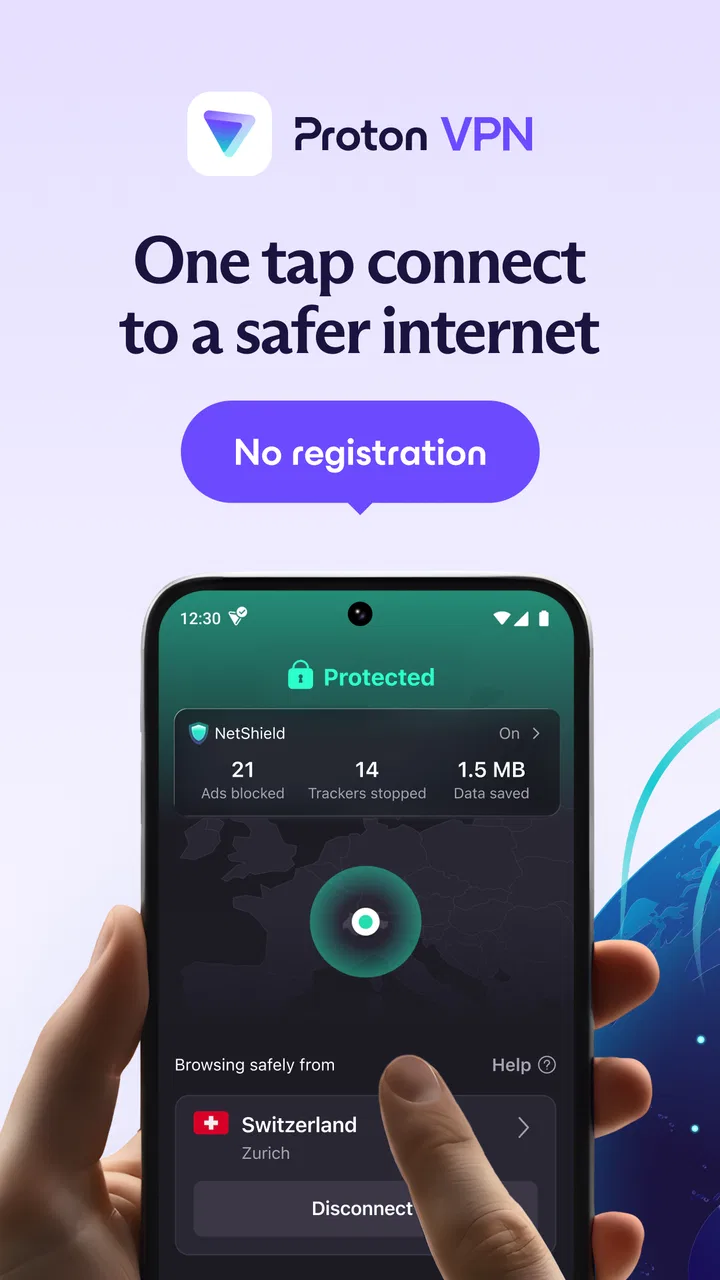
The first thing I noticed is that the app does not need much explanation to perform its basic task. I can open it, choose a location, and establish a VPN connection without navigating through a maze of unrelated tools. That simplicity matters because a privacy app is not useful if its controls are so complicated that I avoid using them.
At the same time, I would not treat a single large connection button as proof that everything is automatically perfect. A VPN changes the route of my internet traffic, but it does not make me anonymous in every situation. Websites can still recognize accounts I sign into, apps can still collect their own information, and a VPN cannot protect me from a suspicious download or a weak password. Proton VPN works best as one layer in a sensible privacy routine, not as a replacement for basic online caution.
The developer name also matters in this context. Proton AG is associated with a broader set of privacy-oriented products, so the app feels more deliberate than a random free VPN that appears in a crowded store search. Still, I judge it by what I can control inside the app rather than by reputation alone. The useful question is whether the interface lets me make an informed decision each time I connect.
For a quick connection, the experience is approachable. I do not need to understand networking terminology to use it. For a more careful setup, I can slow down and consider the location, the reason I am connecting, and whether I want the VPN active for all traffic or only in particular situations supported by my device and configuration. That difference between easy access and deeper control is one of the app’s strongest qualities.
There is also an important trade-off in the free model. The app costs nothing to download and use at its entry level, while in-app purchases range from $9.99 to $119.88 per item. That makes it easy to test without immediately committing money, but the paid options are clearly part of the product’s structure. I would not install it expecting the free experience to behave exactly like a premium subscription.
What I check in the connection screen
Before I trust a VPN connection, I look for visible confirmation rather than assuming the app is active because I tapped a button. Android normally shows a VPN indicator when a VPN is connected, and I use that alongside the app’s own status. This is a small habit, but it prevents a common mistake: browsing as though protection is active after a connection attempt has failed or been interrupted.
I also pay attention to the selected server location. A nearby location is usually the sensible starting point when my goal is a smoother connection, while a distant location may be useful for a specific access need but can introduce more delay. I do not automatically choose the most exotic location. In normal browsing, the closest suitable option is often the better balance.
One less obvious workflow is to separate privacy needs from location needs. If I am checking email on hotel Wi-Fi, I mainly want a protected route and a stable connection. If I am testing how a website behaves from another region, the location becomes the main reason for connecting. Treating those as different tasks helps me avoid blaming the app for slower performance when the real cause is a faraway server choice.
Permissions, accounts, and visible choices
A VPN necessarily needs Android’s permission to create a VPN connection. That is different from granting an app broad access to my photos, contacts, or messages, and I pay attention to that distinction when reviewing privacy tools. I prefer to keep the app’s role narrow: it should handle the VPN connection, while unrelated access remains unnecessary unless Android or another feature explicitly requires it.
Account controls are another part of the trust picture. Proton VPN is not simply a one-tap anonymous switch with no service structure behind it. Depending on how I use it, I may encounter account-related decisions, especially when considering paid features. I want those choices to be clear before I commit, and I would recommend checking the account screen and subscription wording carefully rather than treating the free download as a promise that every capability is unrestricted.
This is also where Proton VPN compares favorably with many ordinary free VPN alternatives. Some free apps make the connection process look effortless while providing little context about the service behind it. Here, the app feels more like a complete product with an identifiable developer and a visible upgrade path. That does not remove the need for personal judgment, but it gives me more to evaluate than a generic “connect” button.
Where it helps in real daily situations
My most realistic use case is a work session in a café. I connect my laptop to the café’s Wi-Fi, but I need to check something from my phone before leaving. I open Proton VPN, choose a sensible nearby location, wait for the connection indicator, and then handle email or account-related browsing. I still avoid opening unexpected attachments and I still use secure passwords, but the VPN adds a useful layer when I do not control the network.
Another good scenario is travel. Hotel networks can be convenient but unpredictable, and I often connect several times during a day. A VPN app is valuable here because I do not have to rethink the whole process each time. I can make the connection part of my routine: join Wi-Fi, open the VPN, confirm the status, then continue. The practical benefit is consistency rather than a dramatic change I can always feel.
It can also help when I want to reduce exposure on shared networks. The app is not a substitute for encrypted websites, but it gives me a single place to manage the connection instead of relying on every individual app to behave perfectly. That is particularly useful when I am switching between a browser, a messaging app, and other services during the same session.
For streaming or location-sensitive services, my opinion is more cautious. A VPN may change the apparent connection location, but services can apply their own rules, and performance depends on the route and server involved. I would not buy a subscription solely on the assumption that every service will work from every location. If that is your main goal, test the exact service and device combination during the available refund or trial conditions rather than relying on general VPN expectations.
Free access versus the paid route
The free option is the reason I can recommend trying the app without much risk. It lets a new user learn the interface, decide whether the connection process fits their routine, and see whether the available choices are enough. For occasional protection on public Wi-Fi, that may be all some people need.
The limitation is that free VPN access is rarely the best match for someone who wants maximum choice and predictable capacity. Proton VPN’s paid plans are where I would expect the broader experience to make more sense, especially for users who connect frequently or need more flexibility. The exact value depends on your habits, so I would not tell a light user to subscribe automatically.
Before paying, I would ask myself three questions. Do I need a VPN most days, or only during travel? Do I need a particular location or simply a protected connection? Am I comfortable managing a recurring purchase rather than using the free tier? Those questions are more useful than comparing headline claims about speed.
The purchase range is broad, from $9.99 to $119.88 per item, so I would read the billing period carefully on the purchase screen. A longer commitment can change the apparent value, but it also means I am committing for longer. I prefer starting with the option that matches my actual use rather than choosing a plan based only on the largest advertised saving.
Small habits that make the app more useful
My first tip is to decide the purpose before choosing a server. For ordinary browsing on an unfamiliar network, I choose convenience and stability. For a location test, I choose the required region and accept that the result may be slower. This simple distinction prevents unnecessary switching and makes it easier to identify whether a problem comes from the VPN, the Wi-Fi, or the destination service.
My second tip is to verify the status after changing networks. Moving from mobile data to public Wi-Fi, reconnecting after sleep, or switching between networks can change the connection state. I make a quick check instead of assuming the previous session is still active. This is especially worthwhile when I am handling sensitive account information.
My third tip is to avoid using a VPN as an excuse to ignore application permissions. I review permissions separately, keep unnecessary access disabled, and remember that the VPN protects network traffic rather than every piece of data an app may already have. That distinction is easy to miss because the word “privacy” can sound broader than the actual function.
A fourth useful habit is to compare performance at the same time of day and on the same network. If a page feels slow, I disconnect briefly and compare the result, then try a more suitable location. Random testing can lead me to the wrong conclusion. A distant server, congested Wi-Fi, or a busy destination can all affect the experience.
What may frustrate experienced users
The main friction is that privacy and convenience do not always point in the same direction. A VPN can add another step before browsing, and some services may react differently when the connection location changes. I am willing to accept that for public networks, but I would not keep it active blindly if a particular app becomes unreliable or if I need the most direct route for a latency-sensitive task.
Free access can also feel restrictive to users who already know exactly what they want. If your priority is a wide choice of locations, frequent switching, or a setup designed around demanding travel and media habits, you may reach the paid decision quickly. In that situation, a competing VPN with a different free policy could be a better fit, even if Proton VPN feels more reassuring in other respects.
On the other hand, people who only want a basic privacy layer may find some alternatives too aggressive with advertising, unclear about ownership, or overloaded with settings. Proton VPN’s cleaner, more considered approach is easier for me to recommend to a friend who is new to VPNs. I would rather guide someone through a small number of understandable choices than ask them to decode a crowded dashboard.
It is also not the right tool for someone seeking complete anonymity without changing their wider behavior. Signing into personal accounts, allowing browser tracking, sharing identifying details, and installing questionable apps can still reveal plenty about a user. The VPN should be viewed as a transport and privacy measure, not an invisibility cloak.
Who should install it, and who should skip it
I think it is a particularly good match for Android users who regularly use public Wi-Fi, travel, or want a straightforward way to add protection without starting with a paid plan. It is also suitable for people who care about the developer behind a privacy tool and want visible choices instead of an anonymous-looking utility.
I would recommend it to a less technical friend because the basic workflow is approachable. I would explain the important habit of checking the connection status and choosing a nearby location for normal use. I would also explain that the free tier is a starting point, not necessarily the final experience for someone with demanding requirements.
I would steer someone elsewhere if their only goal is gaming latency, because adding a VPN route can work against the lowest possible delay. I would also suggest comparing alternatives for a very specific streaming catalog or a large number of simultaneous, location-dependent tasks. Those users should judge the service by their exact destination and routine, not by the general appeal of the app.
For families, the Everyone rating makes the app broadly accessible, but that does not turn it into a parental-control solution. A VPN can change network routing; it does not replace supervision, device restrictions, or age-appropriate guidance. I would make that distinction clear before installing it on a child’s device.
My cautious verdict after using it
Proton VPN: Fast & Secure VPN is one of the more convincing choices for someone who wants a serious VPN app without being forced to pay before understanding the basics. I like its clear purpose, recognizable developer, approachable connection flow, and the fact that it encourages me to think about location and connection status rather than hiding everything behind automation.
My praise comes with boundaries. A VPN does not solve every privacy problem, free access may not satisfy demanding users, and a remote server can make certain activities slower. I would not choose it purely for streaming promises, gaming performance, or the belief that a VPN makes me untraceable. Those are situations where a different tool, a different plan, or no VPN at all might be more appropriate.
For everyday protection on networks I do not control, though, it earns my recommendation. I would install it, keep permissions focused on its actual role, confirm the connection when changing networks, and begin with the free experience before deciding whether paid access matches my routine. That combination of user control and realistic expectations is what makes it worthwhile.
In short, this is a free Tools app for Android 8.0 and later, rated for Everyone, with a substantial user base and a paid upgrade path. Those details are useful, but my final decision rests on the experience: Proton VPN makes the important privacy choice easy to reach while still leaving room for the user to stay responsible. If that is the balance you want, it is a strong place to start.
FAQs for Proton VPN: Secure & Fast VPN
01What makes Proton VPN different from other VPN services?
Proton VPN stands out due to its strong focus on security and privacy. Developed by the creators of ProtonMail, it offers features like Secure Core, which routes your traffic through multiple servers for added protection. Additionally, it adheres to a strict no-logs policy, ensuring that your online activities remain private.
02Is Proton VPN free to use, and what features are included in the free version?
Yes, Proton VPN offers a free version with unlimited bandwidth, which sets it apart from many competitors. However, it's limited to servers in a few countries and supports only one device at a time. The free version does not include advanced features like Secure Core or access to Plus servers.
03How does Proton VPN ensure my data stays secure?
Proton VPN employs high-strength encryption protocols, such as AES-256, to secure your data. It also utilizes Perfect Forward Secrecy, which generates a new encryption key for each session, minimizing the risk of data interception. Additionally, its no-logs policy ensures that your browsing history is never recorded.
04Can I use Proton VPN on multiple devices simultaneously?
With a Proton VPN Plus or Visionary plan, you can connect multiple devices simultaneously, with the number varying based on the plan. The free version, however, supports only one device at a time. Proton VPN is compatible with various platforms, including Windows, macOS, iOS, Android, and Linux.
05Does Proton VPN affect my internet speed?
While using any VPN can potentially reduce your internet speed due to encryption and server routing, Proton VPN is optimized to minimize this impact. Premium users have access to high-speed servers, and choosing a nearby server can further reduce latency. The free version may have slower speeds due to server load.
Pros
- Strong encryption for enhanced security.
- No-logs policy for user privacy.
- High-speed connections available.
- Supports P2P and torrenting.
- User-friendly interface.
Cons
- Limited features on free plan.
- Occasional connection drops.
- Some servers can be slow.
- No live customer support chat.
- Mobile app can drain battery fast.

Proton VPN: Secure & Fast VPN
Gallery